
What is CFBR on LinkedIn? Detailed Guide
CFBR stands for Commenting For Better Reach. It is a practice where LinkedIn users leave a comment on someone’s post to boost that post’s visibility in LinkedIn’s algorithm.
That’s it. The comment can literally just say “CFBR” and it still counts.
How CFBR works
LinkedIn’s algorithm decides which posts to show more people based on how much engagement a post gets, and how fast it gets it. Comments carry more weight than likes or shares.
When you comment on a post, two things happen:
- The post appears in the feeds of some of your connections.
- LinkedIn’s algorithm reads the engagement as a signal that the content is worth spreading.
So when someone comments “CFBR” on a post, they are essentially giving that post an algorithmic push, even without writing anything meaningful.
Why comments matter more than likes
LinkedIn weights engagement in this order: comments > shares > likes.
A like takes one click.
But a comment requires more effort, so the algorithm treats it as a stronger signal of interest. A post with 50 comments will consistently outperform a post with 200 likes in terms of reach.
This is why CFBR works, even when the comment has no real content.
The two ways people use CFBR
To boost someone else’s post: You see a connection’s post about a job search, a layoff announcement, or valuable advice. You drop a comment to push it to your network. The most well-known example of this was during Amazon’s mass layoffs in late 2022. A recruiter posted about people losing jobs, and commenters were actively encouraged to comment just to help the post reach more people faster.
To boost your own post: You publish something and directly ask your audience to comment for better reach. Some people even join LinkedIn engagement groups where members share links to their posts and comment on each other’s content to boost everyone’s reach.
Pros and cons of CFBR
Pros:
- Spreads important content fast, with minimal effort from each person
- Low barrier to participation (anyone can leave one comment)
- Helps with networking since your comment shows up in your connections’ feeds, putting your profile in front of people
- Signals engagement to the algorithm even when the comment is basic
Cons:
- The comment section fills with low-value responses that dilute real discussion
- Results are inconsistent. Not every post benefits equally
- LinkedIn’s algorithm already evaluates profile trust and anti-spam signals, so mass identical comments do not always work as intended
- As LinkedIn adds AI to its platform, repetitive or primitive comments may eventually get de-prioritized rather than boosted
Does CFBR actually work? The honest answer
It is genuinely controversial.
Supporters argue it is an efficient way to help connections spread important content, especially for job seekers who need visibility fast.
Critics point out that it is superficial engagement. One frustrated LinkedIn user described it as “the thoughts and prayers of employment,” meaning it looks like help without providing real value. Many in-house recruiters say they ignore or are actively annoyed by CFBR comments.
The honest answer: it works mechanically (the algorithm does respond to comments), but it works better when your comment adds something real.
When to use CFBR, and when to skip it
Use it when:
- A connection is actively job searching and needs their post seen
- Someone in your network has shared genuinely useful information
- A team member or colleague has posted an important announcement
- You want to help but are short on time
Skip it when:
- The post contains something controversial you have not fully read
- A more thoughtful comment would be more appropriate
- The original poster has signalled they find “CFBR” comments unhelpful
Best practices for commenting effectively
“CFBR” works algorithmically, but it does nothing for your reputation. Treat every comment like a mini post.
Commenting is one of the highest-leverage ways to get your profile in front of people who do not follow you yet. When you comment, it shows up in your connections’ feeds. Their connections see it too.
Personally, I get roughly 10x more reach from commenting than I do from posting. And unlike connection requests, commenting never eats into your weekly invite limit.
Here is how to make that work intentionally:
– Turn on post notifications for influencers in your industry who have at least 10,000 followers. On LinkedIn, go to their profile, click the bell icon, and select “All posts.”
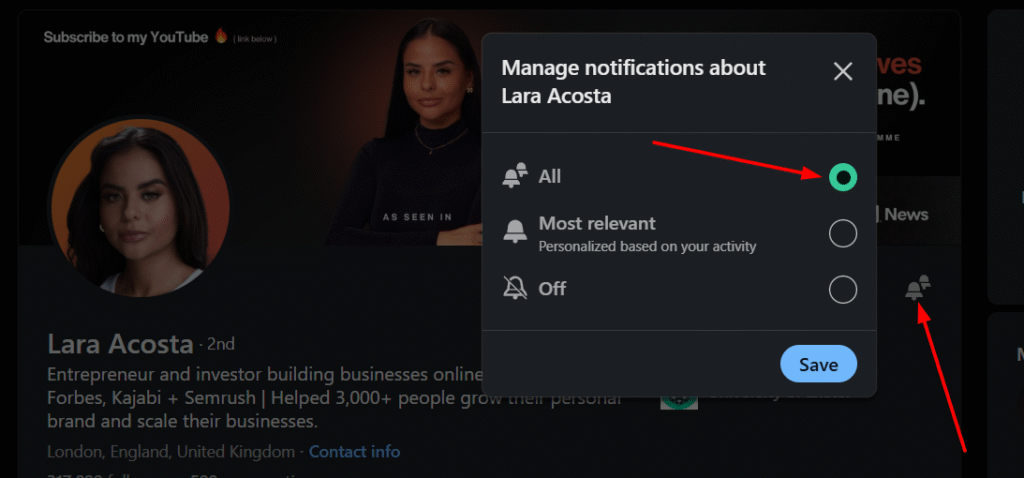
– Comment within the first 30 to 40 minutes of a post going live. The earlier you comment, the longer your comment sits at the top as more people pile in. Authors often check who viewed their profile shortly after publishing — an early comment puts you on their radar before you even send a connection request. LinkedIn’s algorithm heavily favors engagement that happens shortly after a post goes live. A comment left within the first 30 mins of a post being published has significantly more impact than one left three days later.
This also applies in reverse: if you are using a tool or manually browsing someone’s profile to comment on their recent content, make sure you are actually commenting on a recent post. Commenting on a post published a year ago looks odd and does nothing for reach. If you are unsure when a post was published, you can use our LinkedIn post date extractor to check the exact publish date before engaging.
– Write something genuinely useful. A good comment on a post that goes on to get 10,000 views puts your name in front of every single person who reads the comments section. That is an audience you could never build alone from scratch. When their followers start engaging with the post, your comment travels with it. Every like, reply, and share on that post re-exposes your comment to a new set of people.
The floor is low. You do not need to write a paragraph. You just need to write something that could not have been copy-pasted onto any other post. Two genuine sentences outperform four letters every time. Share a quick experience, ask the author a question, or add a data point they did not mention.
– Be consistent rather than sporadic. Dedicate a set time each week to leaving comments. Even one hour per week of genuine engagement compounds over time. Sporadic bursts followed by weeks of silence do not build presence the way regular activity does.
– Combine CFBR with other engagement signals. Comments are the strongest signal, but a combination of comments, likes, and shares pushes content further than any single action alone. If you want to support a post but have nothing meaningful to add in a comment, a like is more appropriate than a hollow “CFBR.”
How to measure whether CFBR is actually working
- Post views and impressions (found in LinkedIn post analytics)
- Engagement rate (total interactions divided by impressions)
- Profile visits in the days following a high-comment post
- New connection requests that come in after a post goes viral
A post performing well with CFBR will show a steep early engagement spike within the first couple of hours, followed by sustained reach over the next 24 to 48 hours as the algorithm continues distributing it.
If you are not seeing a difference, the post itself may not be encouraging enough discussion, or the commenters’ profiles may not be strong enough signals for the algorithm to act on.
Will LinkedIn’s algorithm eventually kill CFBR?
Possibly. LinkedIn is actively integrating AI into its platform. At some point, the algorithm will likely be able to detect repetitive, low-effort comments and de-prioritise rather than boost the content they appear on.
The safest long-term strategy is to use CFBR sparingly and make your comments worth reading. That way, even if the algorithm gets smarter about filtering hollow engagement, your commenting behaviour is already aligned with what the platform will reward.
FAQs
Can I use CFBR on any post?
Yes, but it is most effective on posts that are already getting some engagement. The algorithm amplifies momentum; it rarely creates it from zero.
Is there a limit to how many posts I should comment on?
LinkedIn does not publish a hard limit, but rapid, identical comments in a short window can trigger spam filters. Space out your commenting and vary your wording.
What is a LinkedIn engagement group?
An engagement group (sometimes called an engagement pod) is a private group where members share links to their posts and agree to comment on each other’s content. They are widely used but considered by many as artificial inflation of engagement.
Do CFBR comments help with job searching?
They can. When your comment appears on a post about hiring or industry news, it puts your name and profile in front of recruiters and hiring managers who are engaging with the same content. But instead of CFBR, a thoughtful comment in the right place is one of the most underrated ways to get noticed passively.